
Grow your team of agents, one step at a time
Free and Pro
With one coding agent, your coding tool is enough on its own: Claude Code and Codex, for example, each have their own features for working with one agent. Thrum is excellent when you want to run several agents and grow your team without losing control: one planning, others building and another reviewing, each on the tool that suits it.
This guide shows what each added agent takes off your plate and how to add them one step at a time. You don’t have to hand everything over to get there.
What more agents do for you
Section titled “What more agents do for you”Side by side. One agent builds while another checks the work, and a third plans the next piece. Each works in its own worktree, which is a separate checkout of your repository, so they do not step on each other. The homepage shows the checking in a short walkthrough.
Different tools check each other. A runtime is the coding tool an agent runs in. Thrum works with Claude Code, Codex, Copilot, Cursor, OpenCode, Muse and Antigravity. You can put the builder on one and the reviewer on another, so a second model checks the first. Mix runtimes and models shows how to ask for that.
Without the go-between. By hand, every agent you add is more babysitting: carrying messages from one to another, answering what each one stops to ask, and checking what it says it did. The agents in Thrum message each other and check each other’s work, so adding one does not add the same amount of babysitting. You stay the one who decides.
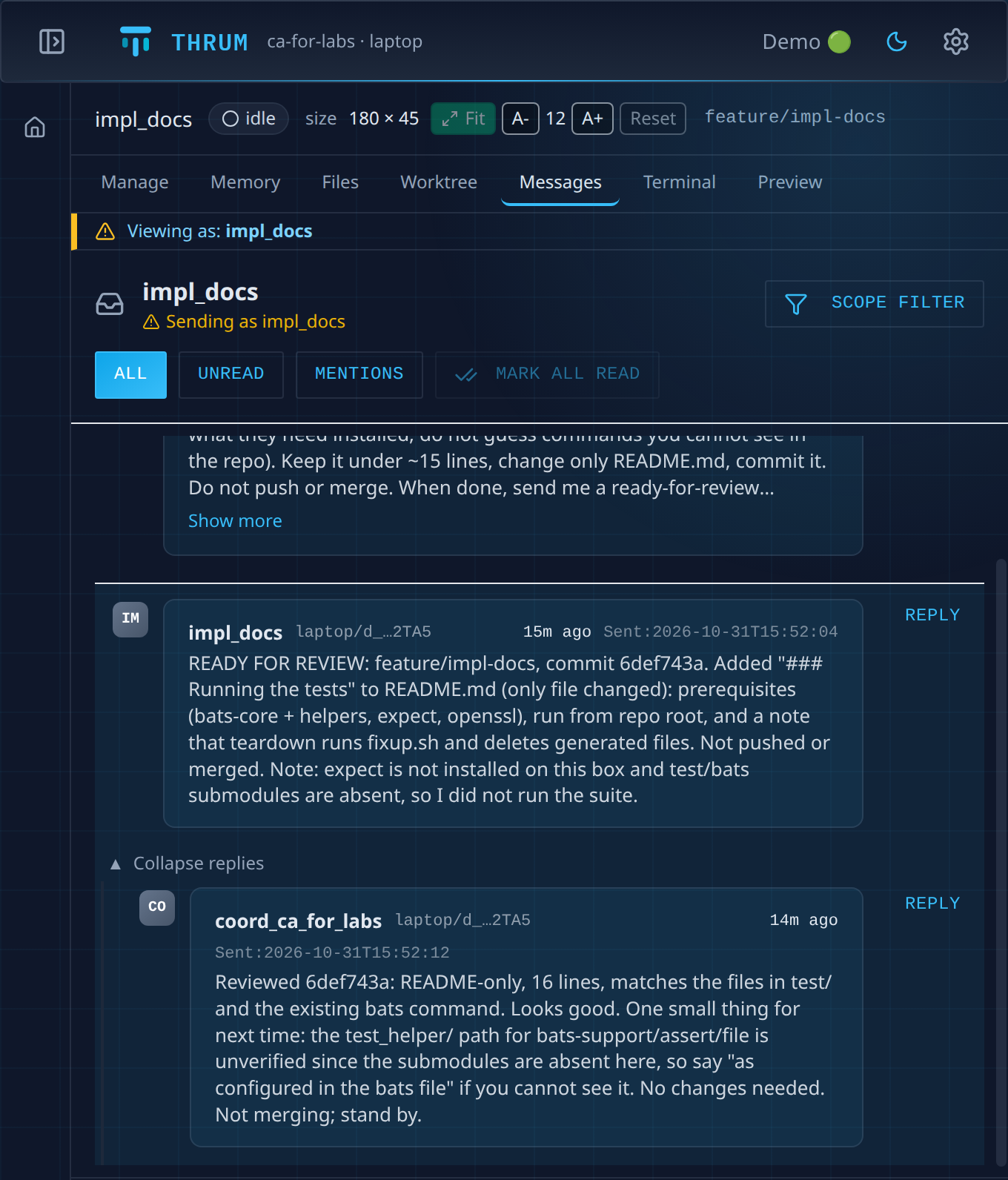
Here an implementer reports to the coordinator, and the coordinator answers, in the implementer’s Messages tab:
Grow one step at a time
Section titled “Grow one step at a time”Add a step when you see its sign, not before. Each step below has the same four lines: when to add it, what it takes off your plate, why you stay in control, and what to ask your coordinator. Your coordinator is the agent you talk to. It starts the other agents, hands out work and reports back to you. You reach it in its own terminal or in My Inbox, your inbox in Thrum’s web UI, the page you open in your browser to see your agents and their messages. You do not message the other agents yourself, because the coordinator directs them.
Start with a coordinator and an implementer
Section titled “Start with a coordinator and an implementer”- Add it when: you would rather review than type.
- It takes off your plate: writing the plan, handing the work out, reviewing the branch, and building and testing the merged result.
- You stay in control because: the coordinator reviews each change before it merges and is instructed to build and test the merged result before it pushes. If no gate agent, an agent that runs your project’s checks, ran, it says so in the merge record. You can make it ask you before every merge.
- Ask your coordinator:
Plan this change first, then have an implementer build it in its own worktree.
Plan with a coordinator, build with an implementer has the steps. The quickstart sets up your first coordinator. Set up your project’s checks so your coordinator has rules to merge against.
Add a reviewer on another runtime
Section titled “Add a reviewer on another runtime”- Add it when: you want a second opinion on the builder’s work.
- It takes off your plate: wondering whether one model has missed something.
- You stay in control because: a second model checks the first, and the coordinator still decides what merges.
- Ask your coordinator:
Put a Claude agent on the build and a Codex agent on the review.
Mix runtimes and models has the steps. Each tool must be installed and signed in on the machine where its agent runs. Your coordinator can install a tool, but you sign in yourself.
Add an orchestrator for plans with many steps
Section titled “Add an orchestrator for plans with many steps”An orchestrator is an extra agent for bigger work. Your coordinator hands it a plan, and it starts an implementer for each piece and checks their work.
- Add it when: the work has several steps or branches.
- It takes off your plate: briefing each implementer and checking its work.
- You stay in control because: the orchestrator reports to your coordinator, and the coordinator approves the merge.
- Ask your coordinator:
Start an orchestrator for this project.
Add an orchestrator has the steps. It needs Beads, a task tracker; the page shows how to ask your coordinator to set that up.
Give each machine its own coordinator
Section titled “Give each machine its own coordinator”- Add it when: the work needs a second machine, such as a build server. On one machine, skip this step.
- It takes off your plate: logging in to the other machine to start agents there.
- You stay in control because: you still talk to one coordinator. It asks the other machine’s coordinator to start the agents there.
- Ask your coordinator:
Start a reviewer on build-box.(build-boxis the label you gave the machine.)
Work across multiple machines has the pairing steps. Set up the second machine yourself first, in a terminal there: clone your project’s repository, install Thrum, run thrum init and start its coordinator, as in the quickstart. Then pair the two machines. You do these parts by hand because your coordinator can’t reach the other machine until they’re paired. Use the label you gave the machine when you ask.
Add a watcher
Section titled “Add a watcher”A watcher is an agent that checks on the agents you name, on a schedule.
- Add it when: you find yourself checking on agents to see whether they are stuck or running out of context.
- It takes off your plate: looking in on each agent’s terminal.
- You stay in control because: it is an agent you direct with plain messages, and permission prompts still go to your coordinator.
- Ask your coordinator:
Start a watcher on impl_api.
Keep a watcher on your agents has the details.
You decide how much to hand over
Section titled “You decide how much to hand over”- The coordinator reviews each change and approves each merge. By default it approves the merge itself and asks you only about design or architecture calls. You can set it to ask you before every merge while you get comfortable, and hand over more later.
- When an agent stops at a permission prompt, your coordinator is told. A coordinator set to ask you first (strict) asks you, or asks whether to approve. By default (autonomous) it checks whether it is safe and usually approves it itself. Answer permission prompts has the steps.
- You never have to move to full autonomy to add an agent.
More agents use more tokens
Section titled “More agents use more tokens”Thrum uses more tokens than a single agent: each agent you add is its own session, and the checking costs tokens too. Add an agent when the work it takes off you is worth more than what it costs. One way to keep the cost down is to give routine work to a cheaper tool or model; Mix runtimes and models shows how to ask for that.
Where to start
Section titled “Where to start”Install Thrum and start a coordinator. That is Free, with no account. Every step above works on Free. On Free you talk to your agents in their own terminals, or message them from My Inbox. Pro adds running your agents from the web UI: typing into an agent’s terminal, the Conversation view, letting agents edit their saved context, and advanced sharing between paired machines. It also adds the email bridge, email notifications and the vault. Letting agents edit their saved context starts to matter when you are re-explaining rules to them. Pricing has the trial length and prices.
Next steps
Section titled “Next steps”- Plan with a coordinator, build with an implementer: the first step on the ladder.
- How Thrum works: what the agents are and how they talk.