
Run agents in tmux
Free and Pro
Your agents each run in their own tmux session, so they keep working after you close the browser or your terminal, and Thrum can show you the live session and hand them messages as they arrive.
tmux is a terminal tool that keeps a program running in a named session, even when nobody is looking at it. Thrum needs it installed. The quickstart lists it under Requirements.
What it looks like
Section titled “What it looks like”Your coordinator is the agent you talk to, which starts the other agents, hands out work and reports back to you. You ask your coordinator to start an agent. It does the setup and tells you when the agent is running. This is an example. Your coordinator’s wording will differ.
A worktree is a separate checkout of your repository on its own branch.
You: Start an implementer for the API refactor on its own branch.Coordinator: Created impl_api in its own worktree on branch feature/api and started it in a tmux session. I sent it the task.You: Stop it when it is done, and clean up.Coordinator: impl_api finished. I stopped its session. The branch is kept for review.The new agent appears as a card on the Agents grid. Click the card, then open the Terminal tab. It shows the agent’s tmux session live, as if you had attached to it yourself.
On Pro, a message box and a keypad sit under the terminal. What you send from the box is typed straight into the session:
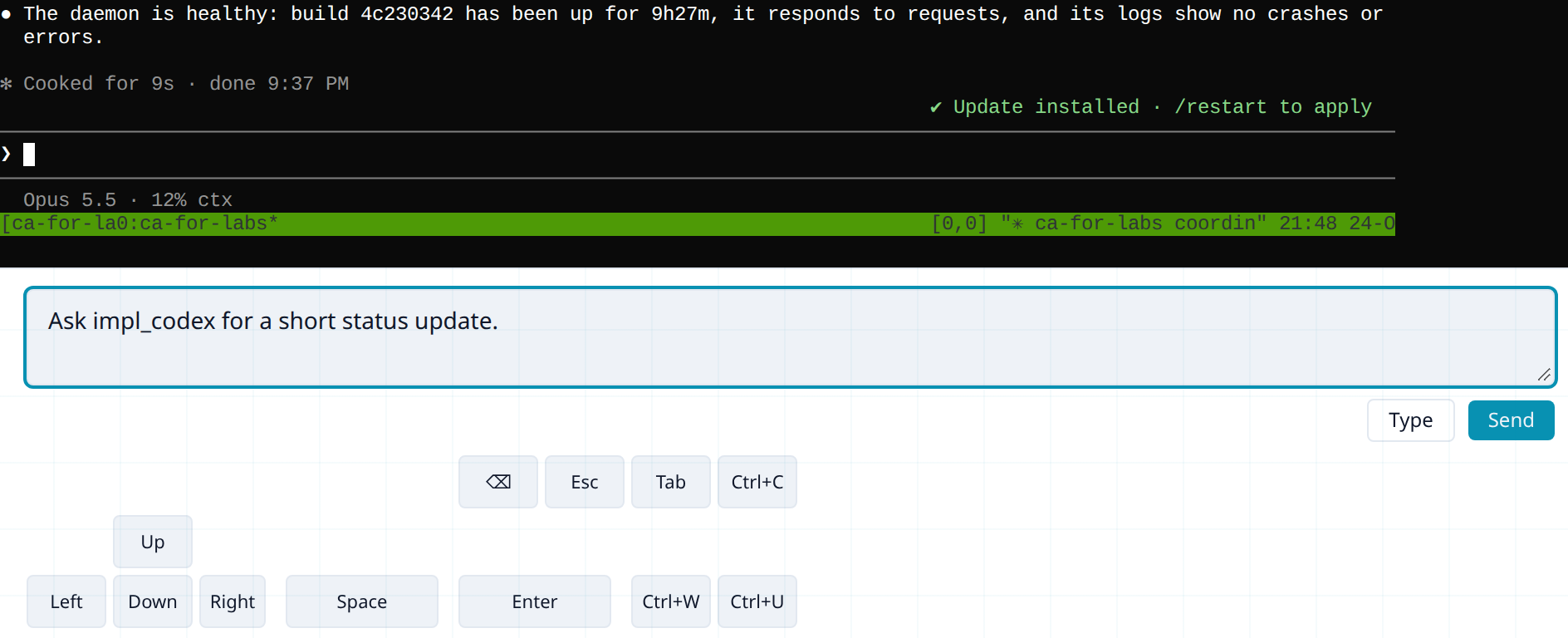
When a Thrum message arrives for it, Thrum types a short line into the session. You see it in the Terminal tab. Thrum’s web UI is the page you open in your browser to see your agents and their messages. When you send it a message from My Inbox, your inbox in Thrum’s web UI,, the sender shows as user: plus your user name, and the line carries a (Sent:...) time stamp:
New message from user:alex-smith -- run 'thrum message get msg_01J...' to read (Sent:2026-10-20T19:29:11)-> message from the human (My Inbox). Reply with 'thrum reply'.The agent reads that line and fetches the message, so it needs no background listener. The line above is shortened, and the second line is wrapped here for reading.
How to use it
Section titled “How to use it”-
Start your first coordinator. This is the one time you start a session yourself, because no coordinator exists to do it for you. The quickstart has the step. It opens Claude Code inside a tmux session and attaches you to it.
-
Ask the coordinator for every other agent. Say what you need: “Start a reviewer for the README” or “Start an implementer for ticket 42”. The coordinator makes a separate checkout of your repository for the agent, starts the session, launches the AI tool inside it and sends the task. To pick the tool or the model, see Mix runtimes and models.
-
Watch an agent. On the Agents grid, click its card and open Terminal. The view is read-only, and watching it is Free for agents on this machine. Watching an agent on a paired machine is Pro.
-
Type to an agent. Open a new terminal window, not the one
thrum tmux starttook over. Runthrum tmux connectwith the agent’s name from its card, for example:Terminal window thrum tmux connect impl_apiOr run it with no name and pick the agent from the list. You are now in its session: type to it as you would in your own terminal. To leave without stopping the agent, detach from tmux (by default Ctrl+B, then D). Or message it from My Inbox. With Pro, you can also type in the Terminal tab: use the message box under the view, and press Cmd+Enter (Ctrl+Enter on Linux) or click Send. Send types the text and presses Enter. Type puts the text in the terminal without submitting it, and the box keeps the text. The keypad below the box sends single keys such as Enter, Esc and Ctrl+C. The keypad Enter submits text that Type put in. On Free, the box and keypad are disabled and the box says “Type to this agent in its own terminal (
thrum tmux connect <name>). With Pro, you can type here.” -
Stop or pause an agent. Ask the coordinator: “Stop impl_api” or “Put impl_api to sleep”. Sleeping can take a few minutes. The card then moves to the Standby tab as
sleeping, with a Wake button, and Wake is immediate. -
Restart an agent without losing its place. Ask: “Restart impl_api and keep its context”. A snapshot is a note an agent writes before a restart or a compaction, with what it did and what is next. The agent saves a snapshot first. Keep context when an agent restarts explains it.
-
Check it worked. The agent’s card is on the Agents grid and its Terminal tab shows output. If the tab says Session not running, the session is gone. Ask the coordinator to start it again, or click Retry after it has.
Free and Pro
Section titled “Free and Pro”Running agents in tmux, watching their Terminal tabs on this machine, typing to them in their own sessions (thrum tmux connect), messaging them from My Inbox and messaging them through your coordinator are Free. Typing into an agent’s Terminal tab in the web UI (the message box and keypad) is Pro. So is watching or typing into the Terminal of an agent on a paired machine.
Next steps
Section titled “Next steps”- Quickstart: start your coordinator.
- Watch your agents in the web UI: the Agents grid and the agent tabs.
- Answer permission prompts: what happens when an agent stops to ask.