
Plan with a coordinator, build with an implementer
Free and Pro
You describe the outcome you want. Your coordinator is the agent you talk to, which starts the other agents, hands out work and reports back to you. A worktree is a separate checkout of your repository on its own branch. Your coordinator writes a plan, gives the work to an implementer that builds it in its own worktree, reviews the result and merges it. If you would rather approve each merge yourself, you can set the coordinator to ask first.
What it looks like
Section titled “What it looks like”This is an example conversation with the coordinator set to ask before each merge. With the default setting it merges after the clean review, without waiting for you. Your coordinator’s wording will differ.
You: Add a CONTRIBUTING guide to the repository. Plan it first.Coordinator: Plan: 1. Write CONTRIBUTING.md: setup, tests, pull requests. 2. Link it from the README. 3. Run each command it shows. Shall I go ahead?You: Yes.Coordinator: Created impl_my_app in its own worktree and sent it the plan.Coordinator: impl_my_app reports the guide is written and linked. I reviewed the branch for quality and against the plan. One finding: the guide does not say how to run the tests. I sent it back.Coordinator: Second review is clean. The branch is ready to merge into your main branch.You: Merge it, then stop impl_my_app and clean up.Coordinator: Merged. impl_my_app is stopped and its worktree is removed.Here is the Agents grid before the merge, with the coordinator and the implementer. The third card is an optional reviewer (How it works):
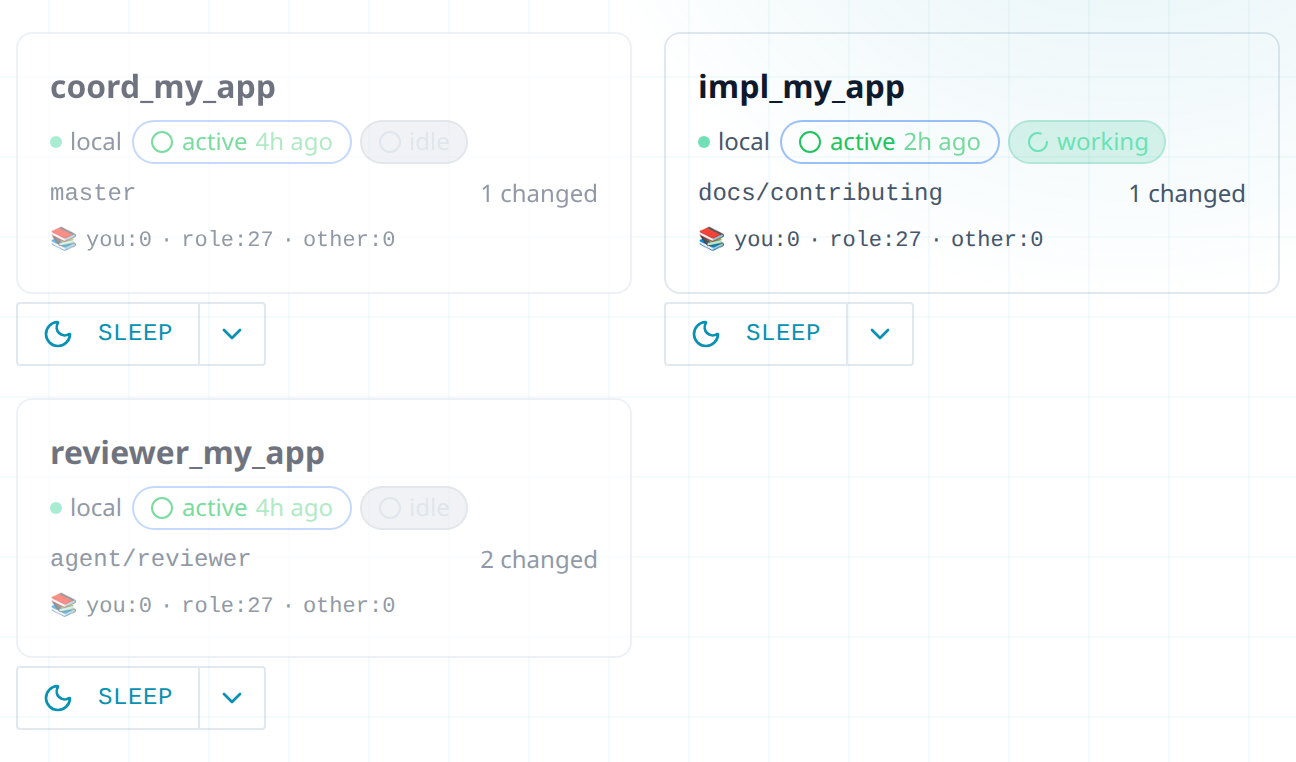
You follow along in the web UI, the page you open in your browser to see your agents and their messages. The conversation with your coordinator is in My Inbox, your inbox in Thrum’s web UI, and each agent has a card on the Agents grid. Watch your agents in the web UI explains the cards and tabs.
How it works
Section titled “How it works”- The coordinator plans, hands out work, reviews and merges. It does not write the code itself.
- The implementer builds. It writes files only inside its own worktree. If a task needs a change outside it, the implementer stops and asks the coordinator.
- The review runs on every branch. The coordinator checks the code quality and checks the work against the plan. It sends all findings to the implementer in one numbered list and reviews again after the fixes. If a third round still has serious findings, it brings the problem to you.
You can also ask for a separate reviewer agent for a second opinion, as in the quickstart.
How to use it
Section titled “How to use it”- In the sidebar, under Your Inbox, click My Inbox. Leave To: as → coordinator. Describe the outcome you want, and ask for a plan first. Click Send. You can also type the request in the coordinator’s own terminal.
- Read the plan where you asked: in My Inbox, or in the coordinator’s terminal. To change it, reply there and say what to change (in My Inbox, click Reply). To accept it, reply
Yes, go ahead. - Watch the build. Click Thrum at the top left to open the Agents grid. Click the implementer’s card, then its Terminal tab to see what it is doing. On Free, ask your coordinator for a progress report in My Inbox, or open the implementer’s own terminal with
thrum tmux connect. tmux keeps each agent running in its own terminal session. - Read the coordinator’s report where you asked, in My Inbox or in its terminal. It covers what the implementer did and what the review found. By default it has also merged the branch. Reply to ask for changes. If you set the coordinator to ask first (see below), it waits for you: tell it to merge when you are happy.
- Check it worked. Ask
Which files changed, and what did the review find?The coordinator names the files and lists the findings. Before a merge, you can also see the files in the implementer’s Worktree tab.
Make the coordinator ask before it merges
Section titled “Make the coordinator ask before it merges”By default the coordinator reviews each change and approves the merge itself, asking you only about design or architecture calls. You can switch it to ask you first.
Switch it. Ask your coordinator: Switch yourself to strict mode, so you ask me before each merge. It changes its instructions, then restarts itself, or compacts (shrinks its conversation to a summary), so it picks up the change.
Check it worked. When the next branch is ready, the coordinator tells you and waits for you to say merge. You can also ask Do you ask me before you merge?
Go back. Ask: Switch yourself back to autonomous mode. It rewrites the templates and restarts itself again.
Next steps
Section titled “Next steps”- Add an orchestrator: for work with several steps or branches.
- Message your agents: how your requests and the agents’ questions travel.
- Keep context when an agent restarts: an implementer that restarts mid-task still knows its plan.
- Quickstart: your first two agents: set up Thrum and create your first reviewer.