
Connect a tool through MCP
Free and Pro
MCP, the Model Context Protocol, is a standard way for an AI tool to call another program. Thrum includes an MCP server. A tool that supports MCP can use it to message your other agents, with no shell commands, and to read its own messages and see who is on the team.
You rarely need this page. Claude Code gets Thrum from the plugin in the quickstart. Codex, Cursor, GitHub Copilot CLI, opencode, Antigravity and Muse have their own pages. Use this page for another tool that supports MCP.
Before you start
Section titled “Before you start”- Your coordinator is the agent you talk to, which starts the other agents, hands out work and reports back to you. Thrum set up in your repository, with a running coordinator. Follow the quickstart first.
- A tool that supports MCP, installed on this machine.
- An agent registered for the folder the tool runs in. The server picks the agent from the folder’s identity file, which records which agent the folder belongs to (in
.thrum/identities/), and stops with an error if it finds none. Step 1 below checks this.
What it looks like
Section titled “What it looks like”This is an example conversation. Your coordinator’s wording will differ.
You:  I also use a tool that supports MCP. Connect it to Thrum so it can message the other agents.
Coordinator:  Added the Thrum MCP server to that tool's settings for this repository. Restart the tool. Then ask it to list the Thrum agents.
(You restart the tool and ask it.)
You:  Use Thrum to list the agents.
Tool agent:  Four agents: coord_my_app, impl_ratelimit, rev_ratelimit and me.
The coordinator edits the settings file. You restart the tool, because most tools read their MCP settings at start.
What the tool gets
Section titled “What the tool gets”The server gives the tool four tools:
| Tool | What it does |
|---|---|
send_message |
Sends a message to another agent by name, for example @coord_my_app. A reply can point at an earlier message. |
check_messages |
Returns the unread messages for this agent. |
wait_for_message |
Waits until a message arrives or a time limit passes. The default limit is five minutes. |
list_agents |
Lists the registered agents and their status. |
list_agents returns, for each agent, its name, role, module, status and when it was last seen. The status is active if the agent was seen in the last 2 minutes, and offline otherwise. check_messages returns the unread messages for this agent, oldest first, and does not mark them read.
The tool acts as the agent registered for the folder it runs in. It does not pass an identity with each call. If two agents share one folder, the server cannot tell which one the tool is, and stops with an error.
How to use it
Section titled “How to use it”-
Check what you have. Thrum’s web UI is the page you open in your browser to see your agents and their messages. My Inbox is your inbox in Thrum’s web UI. Ask your coordinator (in its terminal, or in My Inbox):
Is Thrum running, and is there a registered agent for the folder my tool runs in?If there is none, ask:
Register an agent for the folder my tool runs in.Your coordinator checks the folder first. If your tool runs in your repository, where Thrum is set up, that is all it needs. If the folder is somewhere else, the coordinator asks you how to set it up. -
Ask your coordinator:
Add the Thrum MCP server to <tool name> for this repository.Replace<tool name>with the name of your tool. The coordinator edits the tool’s MCP settings file. If it asks where that file is, look in your tool’s documentation. -
Restart the tool. Close it and open it again. Use its own way to quit.
-
Check it worked. Ask the tool’s agent “Use Thrum to list the agents.” It should name the agents you see in the Agents grid in the web UI. Then ask it to send a message to the coordinator and ask the coordinator whether it arrived.
The message shows in your coordinator’s Messages tab, sent by the agent registered for your tool. Here that agent is
mcp_tool: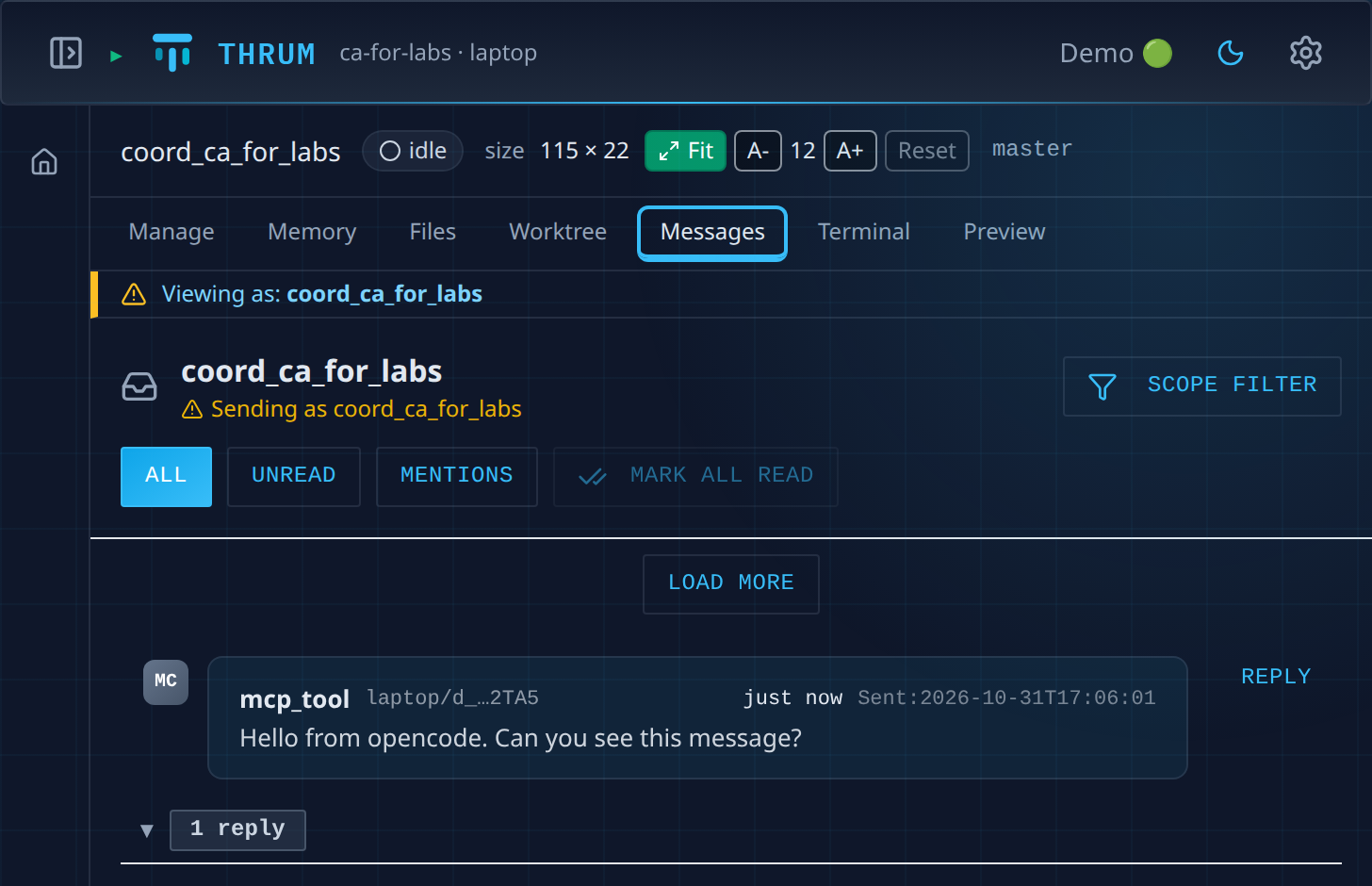
What the coordinator adds
Section titled “What the coordinator adds”This is what your coordinator puts in the tool’s MCP settings. You only need it if the coordinator cannot edit those settings and asks you to.
The server is started by the tool, as a program that talks over standard input and output. This is the one command to give the tool:
thrum mcp serveMost tools take an entry like this in their MCP settings. The file and the field names differ by tool, so check your tool’s MCP documentation. For example, Thrum puts the entry in .claude/settings.json for Claude Code, in .muse/mcp.json for Muse, and in opencode.json for opencode. This is the entry for Claude Code:
{ "mcpServers": { "thrum": { "type": "stdio", "command": "thrum", "args": ["mcp", "serve"] } }}This is the entry for opencode:
{ "mcp": { "thrum": { "type": "local", "command": ["thrum", "mcp", "serve"], "enabled": true } }}If the server does not start, the usual causes are that Thrum is not running, or that no agent is registered for the folder the tool runs in.
Next steps
Section titled “Next steps”- Messaging between agents: how messages, replies and the inbox work.
- Mix runtimes and models: run agents on different tools.
- Quickstart: set up Thrum and start your coordinator.