
Add an orchestrator
Free and Pro
An orchestrator is an extra agent for bigger work. Your coordinator is the agent you talk to, which starts the other agents, hands out work and reports back to you. Your coordinator hands it a plan that is split into epics, the phases of the work. A worktree is a separate checkout of your repository on its own branch. It starts an implementer (an agent that builds a change in its own worktree) for each piece, checks their work and brings the finished branches back to your coordinator for approval. It never writes code itself.
Before you start
Section titled “Before you start”- A running coordinator. The quickstart sets one up.
- Beads, a task tracker. The orchestrator uses it to plan the work, and it does not work without it. Step 1 under How to use it checks for it and sets it up. See Track tasks with Beads.
What it looks like
Section titled “What it looks like”This is an example conversation. Your coordinator’s wording will differ.
You:         Plan and build the rate limiter from dev-docs/plans/rate-limiter.md.Coordinator: Handed the plan to orchestrator_main. It reports to me. I will             tell you when there is something for you.
You:         Which implementers is the orchestrator running?Coordinator: Three. impl_limiter_core and impl_limiter_config build epics A             and B in parallel. impl_limiter_docs starts after both finish.
The orchestrator sends your coordinator short messages like these:
Plan: 3 worktrees needed. Epics A and B in parallel, Epic C after bothare done. I'll report when all three are finished.
All epics complete. Merge report: <changes per branch>. No open reviewfindings. Ready to merge to main. Requesting coordinator approval.
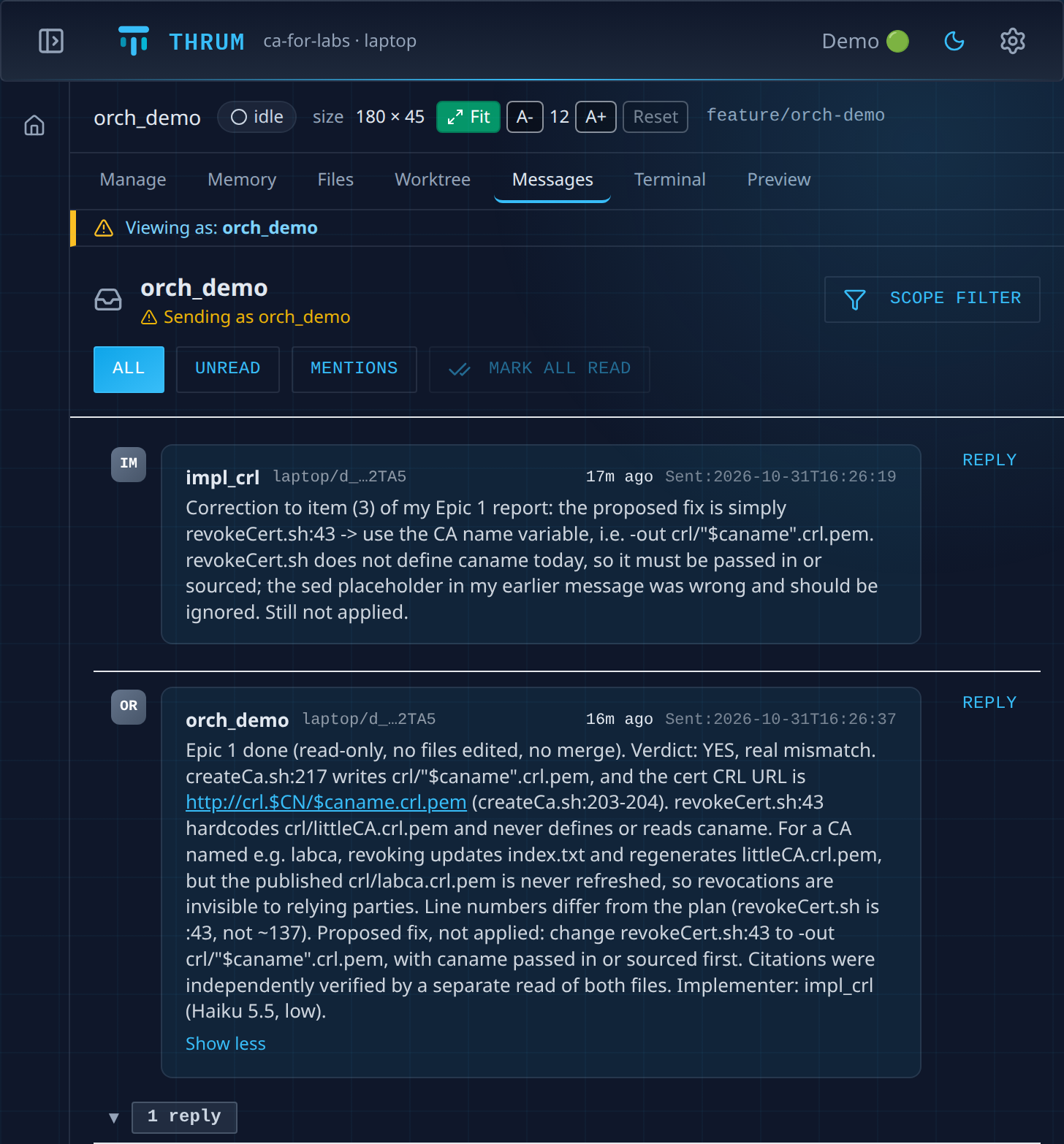
In the web UI, the orchestrator’s Messages tab shows these messages. Here an implementer corrects a fix it proposed, and the orchestrator sends the coordinator a summary it has checked:
When to add one
Section titled “When to add one”For one change with one implementer, your coordinator alone is enough. See Plan with a coordinator, build with an implementer.
Add an orchestrator when the work has several steps or branches. It runs the implementers day to day, so your coordinator stays on decisions.
How it works
Section titled “How it works”-
Your coordinator starts it. Ask for an orchestrator and your coordinator creates one in its own worktree and session, the same way it creates any agent. Your coordinator may keep two or three orchestrators running, so one may already be on your team. An orchestrator keeps running and takes the next plan when the last one is done. When one is on your team, your coordinator prepares the plan and the instructions for it and hands the work to it by message. You do not need to tell it.
-
It reports to your coordinator, not to you. It does not ask how much you want to be consulted, and it does not ask whether to start. It sends your coordinator a short plan summary and starts without waiting. Its progress reports and its merge report go to the coordinator that gave it the plan.
-
It builds the work in epics. An epic is one phase of the plan, built on its own branch with its tasks. The orchestrator creates a worktree for each implementer, which is a separate checkout of your repository, and sends each its task.
-
You choose how often it pauses. There are two choices.
end_onlyis the default: it runs every epic, then sends one final report before the merge.per_epicstops after each epic: it tells your coordinator the epic is complete and waits for a go-ahead. If none comes, it sends your coordinator a reminder after 5 minutes and does not continue.To pick one for a plan, ask your coordinator:
Hand the plan to the orchestrator with per_epic.If neither the plan nor the message names a choice, the orchestrator uses the default inorchestration.default_autonomyin.thrum/config.json. To change that default, see Configuration.Choose
per_epicwhen you want to see each epic’s result before the next one starts. Chooseend_onlywhen you trust the plan and want a finished report. -
It reviews the work itself. It runs its own reviews, one for code quality and one against the plan, and sends the findings back to the implementer. After 2 full rounds with serious findings still open, it stops and brings the problem to your coordinator.
-
Your coordinator approves the merge. The orchestrator sends your coordinator a merge report. By default the coordinator approves the merge, asking you only about design or architecture calls. The orchestrator then does the merge. If you set your coordinator to ask first, it asks you before it approves (how).
How to use it
Section titled “How to use it”Every step below is a request to your coordinator. Send it from My Inbox, your inbox in Thrum’s web UI, or type it in your coordinator’s own terminal. On Free, type to an agent in its own terminal; typing in the web UI needs Pro. If you closed the coordinator’s terminal, thrum tmux connect reopens it.
- Check Beads. Ask your coordinator:
Is Beads set up in this project? If not, set up Beads in this project, and turn on Thrum's Beads support.See Track tasks with Beads. - See what is running. Ask your coordinator:
Which orchestrators are running?It names them. If one is already running, go to step 4. - Ask for an orchestrator. If none is running, ask your coordinator:
Start an orchestrator for this project.It creates the orchestrator in its own worktree and session and tells you its name. On the Agents grid, a card for the orchestrator appears. Click the card and open Terminal to watch it. - Give it work. Ask your coordinator for the outcome you want, for example:
Plan and build <what you want>.Your coordinator hands the plan to the orchestrator, so you do not need to name it. See Plan with a coordinator, build with an implementer. - Answer your coordinator if it asks. The orchestrator reports to your coordinator, not to you. It asks you about design or architecture calls, and about the merge if you set it to ask first (how). If the setting is
per_epic, the orchestrator also stops after each epic until your coordinator gives the go-ahead. - Check it worked. Ask your coordinator:
Is the orchestrator's plan merged?Until it is, ask:Which implementers is the orchestrator running?
To stop an orchestrator, ask your coordinator: Stop the orchestrator when its plan is merged. To clean up its checkout too, ask: Stop the orchestrator when its plan is merged, and remove its worktree.
Next steps
Section titled “Next steps”- Plan with a coordinator, build with an implementer: the loop the orchestrator extends.
- Run agents in tmux: what the sessions are and how to watch them.
- Watch your agents in the web UI: the Agents grid and the Terminal tab.