
Mix runtimes and models
Free and Pro
Your coordinator is the agent you talk to, which starts the other agents, hands out work and reports back to you. Your coordinator can start each agent on a different AI tool and model, so a hard task goes to your strongest model and a routine one goes to a cheaper tool. All the agents still message each other the same way, whatever tool each one runs in.
A runtime is the AI coding tool an agent runs in, for example Claude Code or Codex. The agent is the worker. The runtime is the tool it uses to think and type.
What it looks like
Section titled “What it looks like”This is an example conversation. Your coordinator’s wording will differ.
A worktree is a separate checkout of your repository on its own branch.
You:         Add a rate limiter to the API. Put a Claude Opus agent on the             design and implementation, and a Codex agent on the tests.Coordinator: Created two agents, each in its own worktree:             - impl_ratelimit on Claude Code, model opus             - impl_ratelimit_tests on Codex, its default model             Both have the task. I'll tell you when each one reports back.
You:         Which tool is each agent running?Coordinator: impl_ratelimit runs Claude Code. impl_ratelimit_tests runs             Codex. I run Claude Code.
You do not message the implementers yourself. The coordinator sends them the task and reads their replies, whatever tool each one runs in.
Thrum’s web UI is the page you open in your browser to see your agents and their messages. 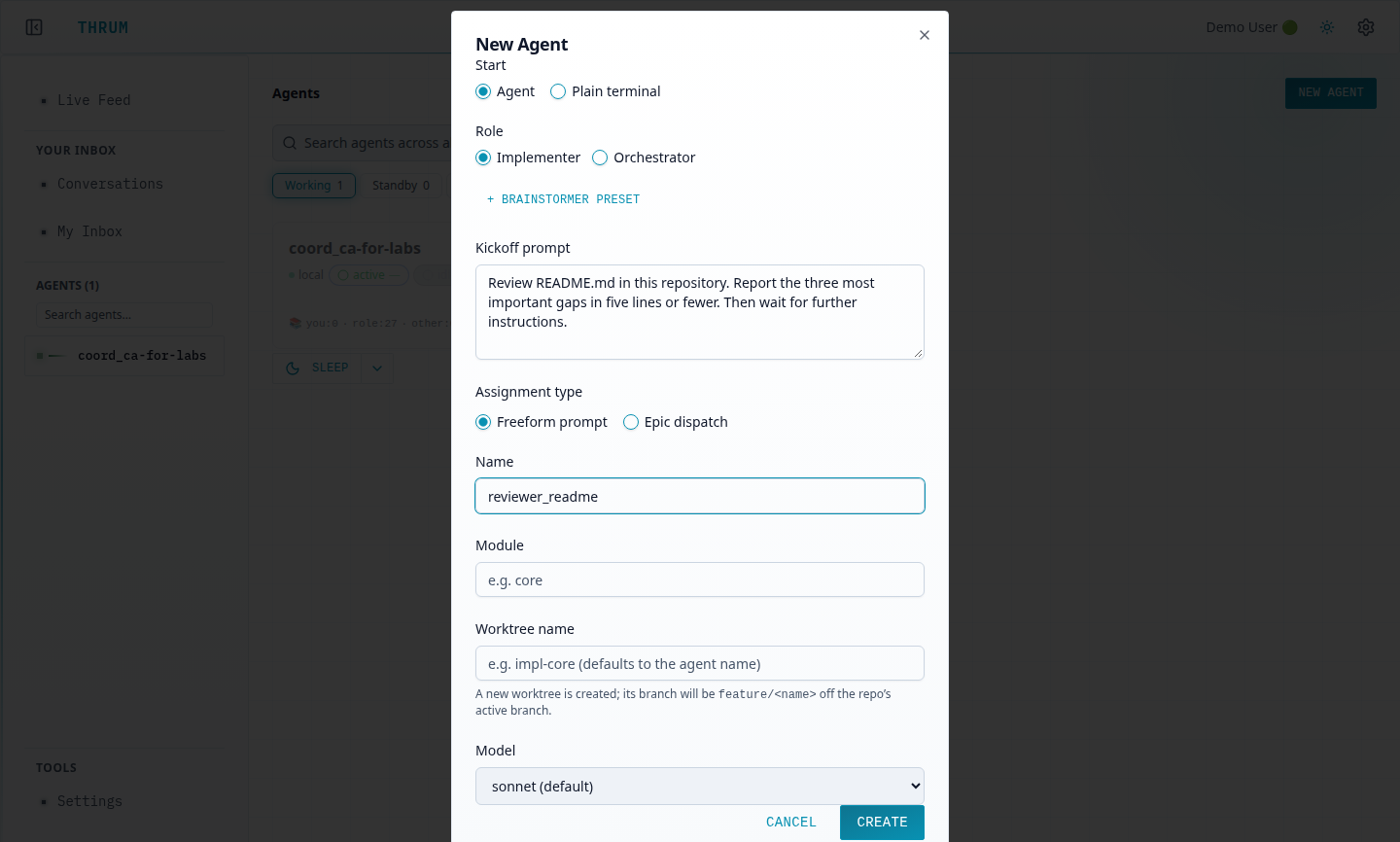
Supported runtimes
Section titled “Supported runtimes”The coordinator can start any of these. Each needs its own command-line tool installed on the machine where the agent runs, plus the Thrum plugin or setup for that tool.
| Runtime | Command it runs | What it needs |
|---|---|---|
| Claude Code | claude |
Claude Code, and the Thrum plugin from the quickstart. This is the default runtime. |
| OpenAI Codex | codex |
The Codex CLI, with the Thrum plugin installed. See Codex. |
| opencode | opencode |
The opencode CLI, with the Thrum plugin installed. See opencode. |
| Cursor | agent |
Cursor’s agent command-line tool, with the Thrum plugin installed. See Cursor. |
| GitHub Copilot CLI | copilot |
The Copilot CLI (@github/copilot on npm), with the Thrum Copilot plugin from its marketplace. See GitHub Copilot. |
| Antigravity | agy |
The Antigravity CLI, with the Thrum plugin installed. See Antigravity. |
| Muse | muse |
The Muse CLI, with the Thrum plugin installed through Muse’s plugin marketplace. See Muse. |
Thrum also lists a plain shell for people who want a terminal on the team. It is not an AI tool, so it is not in the table.
Runtimes differ in how Thrum helps them when their context fills up. A compaction is when the tool shrinks a conversation that has filled its context window. For Claude Code and Codex agents, Thrum loads the agent’s briefing again after a compaction. For Cursor, Copilot, opencode, Antigravity and Muse agents, ask the coordinator to restart the agent instead. A snapshot is a note an agent writes before a restart or a compaction, with what it did and what is next. It picks up from its snapshot. See Keep context when an agent restarts.
How to use it
Section titled “How to use it”- Install the command-line tool for each runtime you want, on the machine where the agents run. Sign in to each tool the way you do today. Thrum does not sign in for you.
- Ask your coordinator to create an agent on a runtime and model. My Inbox is your inbox in Thrum’s web UI. Send it from My Inbox, or type it in the coordinator’s own terminal. You need a running coordinator; the quickstart sets one up. Name both runtime and model in the same message, as in the example above. If you leave the model out, Thrum picks a default for the role.
- Give the coordinator the task. It sends the task to the agent and brings back the result.
- Check it worked. Ask “Which tool is each agent running?” The coordinator names the runtime of every agent. Open an agent in the web UI and check its Terminal tab to see the tool’s own screen.
The New Agent dialog
Section titled “The New Agent dialog”You can also create an agent from the web UI. On the Agents page, choose New agent. In the New Agent dialog:
- Start is Agent or Plain terminal.
- A role is what an agent is for, such as coordinator, implementer or reviewer. Role is required. Choosing Implementer adds Assignment type. Freeform prompt sends the text from Kickoff prompt as the agent’s first task. Epic dispatch lets you pick an epic, one phase of a plan, from a list.
- A module is a label for the part of the code an agent covers. Module is required. Name, Worktree name and Parent coordinator are the other fields.
- Model offers Role default,
sonnet,haikuandopus.
While Thrum sets the agent up, the button reads Creating…, and the dialog closes when it is done. After 30 seconds the dialog adds: “Still provisioning. This can take several minutes.” The dialog has no runtime field, and agents created there always run on Claude Code. To start an agent on any other runtime, ask the coordinator.
When one tool hits its limit
Section titled “When one tool hits its limit”Sometimes an AI tool stops because you reached its usage limit. Thrum does not move the work for you. You tell the coordinator, and it hands the task to an agent on another runtime.
To see how close each tool is to its limit, turn on account usage.
You: The Claude agent hit its limit. Give the rate-limiter work to a Codex agent.Coordinator: Understood. I started impl_ratelimit_codex on Codex in a new worktree and sent it the task. It does not have the other agent's conversation, so I included the task text and the branch where the work stopped. I'll report when it replies.Plan on one message from you for each hand-off. The shared inbox and the agent’s messages stay in place. The new agent’s conversation is new, and a different tool may not continue exactly where the first stopped.
Free and Pro
Section titled “Free and Pro”Every runtime and model in the table works on Free. You ask your coordinator from My Inbox or in its own terminal (thrum tmux connect). Typing the request into the coordinator’s Terminal tab in the web UI is Pro.
Next steps
Section titled “Next steps”- Planner and implementer: how the coordinator splits work between agents.
- tmux keeps each agent running in its own terminal session. Run agents in tmux: where the agents’ sessions live and how to watch them.
- Messaging between agents: how the coordinator and the implementers talk across runtimes.