
Set up the email bridge
Pro
When an agent messages you, the email bridge sends it to your mailbox, and your reply goes back to that agent. You can also start a conversation by emailing yourself: the mail goes to each agent you @mention. You do not need to be at your desk.
The email bridge needs Pro. On Free, Settings shows “Email bridge is a Pro feature.” in its place. The Telegram bridge is Free.
Before you start
Section titled “Before you start”- Pro. The 14-day trial counts, and so does Pro free for a public repository.
- A mailbox you can sign in to from another program with an app password. An app password is a separate password your mail provider creates for one program, so you never share your main one. Thrum signs in with an app password only.
- Gmail: turn on 2-Step Verification, then create an app password at myaccount.google.com/apppasswords. Google shows the 16-character password once.
- Fastmail: create an app password in Fastmail’s settings, with access to mail (IMAP and SMTP). Fastmail shows it once.
- Your coordinator is the agent you talk to, which starts the other agents, hands out work and reports back to you. Thrum is set up in your repository, with the daemon running and a coordinator agent. The quickstart covers this. The daemon is the background process Thrum runs on your machine.
Which mail providers work
Section titled “Which mail providers work”| Provider | Status |
|---|---|
| Gmail | Supported. |
| Fastmail | Best effort. |
| iCloud | Not supported yet. Incoming mail is rejected. |
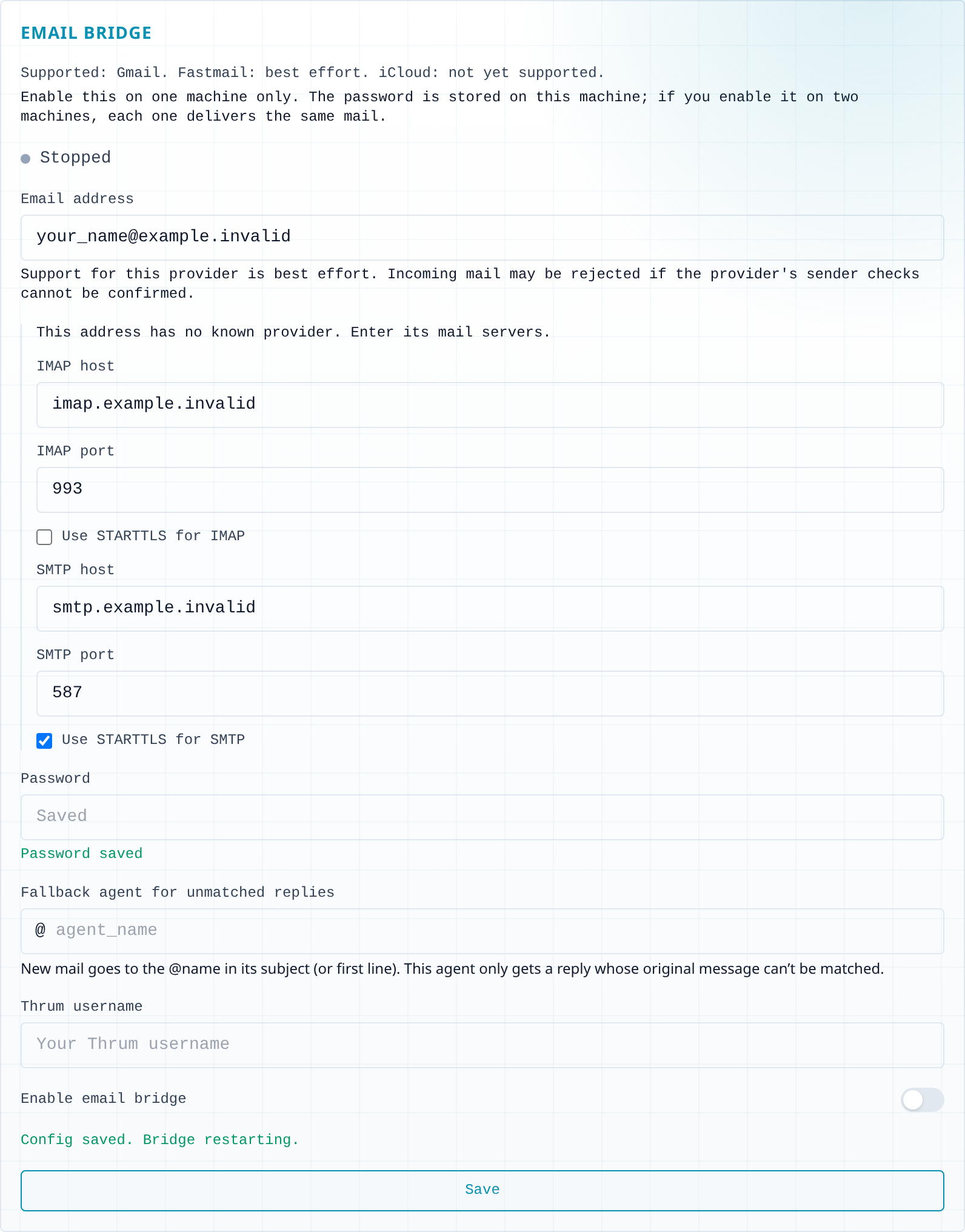
| Any other provider | Best effort, once you enter its mail servers. Incoming mail may be rejected. |
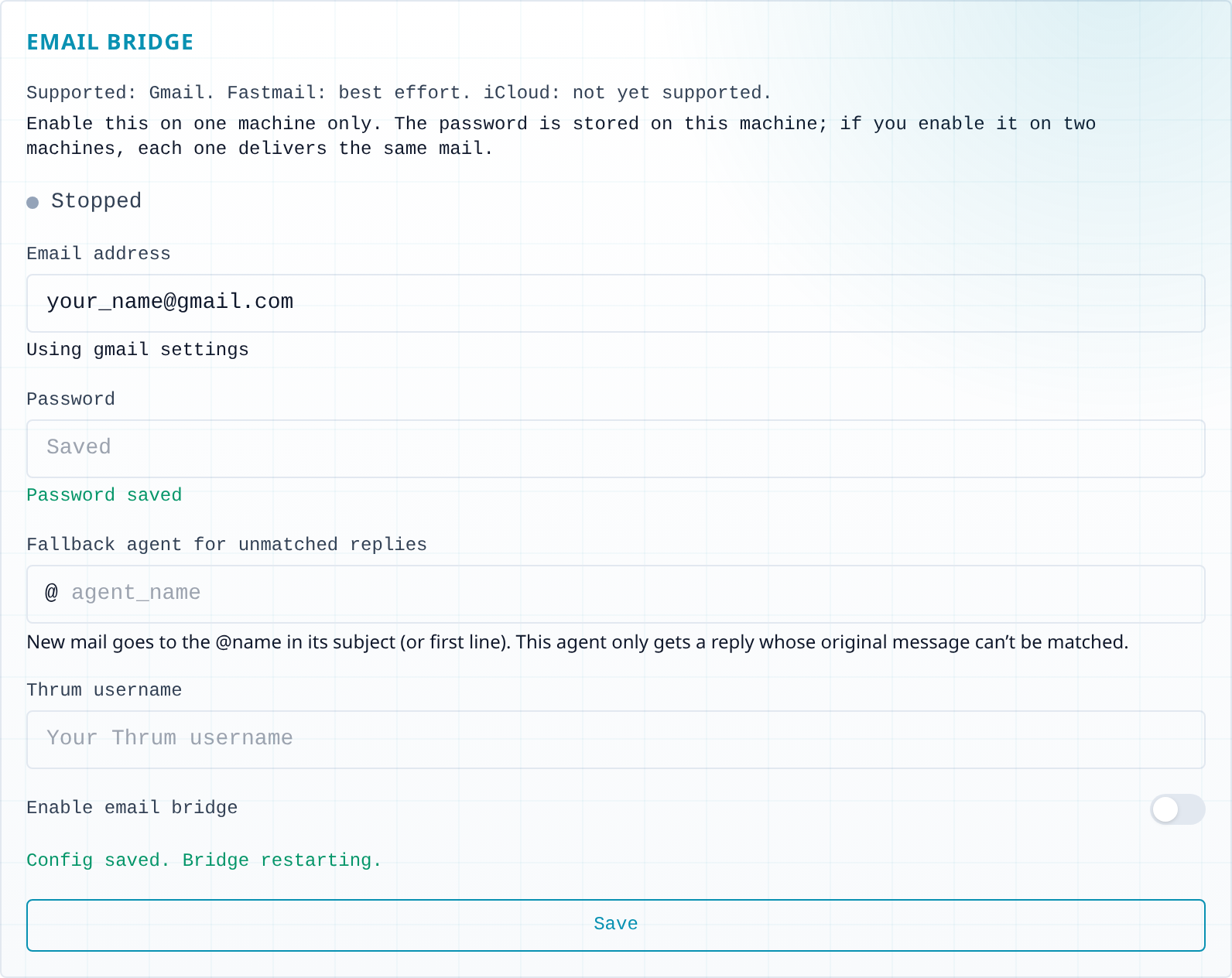
Under the address, the Email Bridge section warns when the provider is not fully supported: “This provider is not supported yet: incoming mail will be rejected.” or “Support for this provider is best effort. Incoming mail may be rejected if the provider’s sender checks cannot be confirmed.”
What it looks like
Section titled “What it looks like”You send a mail from your mailbox to your own address. Put the agent’s name with @ in the subject and your question in the body. This is an example. Your agent’s wording will differ.
You (email to yourself):  Subject: @coordinator_main  Body:    Is the login fix merged?
Coordinator (reply):  Not yet. It passed review and is waiting on the full test run.
You (reply to that mail):  Tell me when it is done.
Write your message in the body; a mail with only a subject is not delivered.
The reply comes from your agent, to your own address, with a subject that starts with [thrum] and the agent’s name. Thrum’s web UI is the page you open in your browser to see your agents and their messages. My Inbox is your inbox in Thrum’s web UI. In the web UI, the same exchange appears in My Inbox, under Your Inbox.
How to use it
Section titled “How to use it”- Open the Email Bridge section. In the web UI, open Settings in the sidebar. In the General tab, find Email Bridge, below Telegram Bridge.
- Enter your address and password. Type your mailbox address in Email address. Type the app password in Password. Thrum keeps the password in its vault, an encrypted store on your machine, not in
config.json, and never shows it again. When it is saved, Password saved appears.- Gmail or Fastmail: the section says Using gmail settings (or the provider’s name). There is nothing more to fill in.
- iCloud: not supported yet. The section warns that incoming mail will be rejected. Other providers: best effort. For an address with no known provider, the section also says “This address has no known provider. Enter its mail servers.” Fill in IMAP host, IMAP port, SMTP host and SMTP port with your provider’s values. The ports start at 993 (IMAP, with Use STARTTLS for IMAP off) and 587 (SMTP, with Use STARTTLS for SMTP on). Change them only if your provider says otherwise.
- Fill in the two names. In Fallback agent for unmatched replies, type the name of an agent, usually your coordinator. Thrum needs it filled in to turn the bridge on. In Thrum username, type your Thrum username: the name next to the inbox icon at the top of My Inbox, for example
demo-user. It is not the display name in the top-right corner. The agent receives your mail as a message from that user. - Turn it on. Switch on Enable email bridge and select Save. The bridge restarts with the new settings. You do not restart the daemon.
- Check it worked. The status above the form reads Running. From your mailbox, send a short mail to your own address, with your coordinator’s name in the subject, such as
@coordinator_main, and your question in the body. Thrum checks the mailbox about once a minute by default, so give it a moment. The reply arrives in your mailbox.
The Email Bridge section for a Gmail address with the password saved:
For an address with no known provider, the mail server fields appear:
Or, in your coordinator’s terminal (the one you started it in), ask:
Set up the email bridge.
The web form above is the cleaner route: the password is write-only there.
How mail finds the right agent
Section titled “How mail finds the right agent”- A new mail goes to each agent you name with
@namein the Subject, or in the first line of the body when the Subject names none. For example, the subject@coordinator_maingoes to the agentcoordinator_main. Use the agent’s exact name. If you are not sure of it, ask your coordinator:Who is on my team? - If no name matches, Thrum drops the mail.
- When you reply to a mail an agent sent you, your reply goes back to that agent.
- The fallback agent only gets a reply that Thrum cannot match to its original mail.
- Any agent on this machine that sends a message addressed only to you reaches you by email, unless your preferred channel is Telegram. A message to you and others is not forwarded. To get a ping when something finishes, ask your coordinator:
Message me when the test run finishes.It goes to your inbox, and the bridge forwards it.
What Thrum does with your mail
Section titled “What Thrum does with your mail”- Thrum delivers the body of your mail. It reads the subject only to find the
@nameof an agent, and it ignores attachments. - Thrum does not remove quoted text. A reply typed above an earlier mail delivers the whole thread to the agent, so delete the quoted part first if the agent does not need it.
- Thrum looks only in your Inbox, at mail from the last 24 hours that you sent from your own address to your own address. Mail it drops leaves one line in the daemon log and no notice.
- Thrum skips a message larger than 10 MB.
Next steps
Section titled “Next steps”- Message your coordinator on Telegram: the Telegram bridge. Replies go back to the agent in both; new Telegram messages go to the agent you chose.
- Get a copy of your messages by email: email notifications. They only send; a reply does not reach the agent.
- Message your agents: how agents send and answer messages.
- Fix email bridge problems: what to check when you get no reply.