
Fix email bridge problems
Pro
When an agent messages you, the email bridge sends it to your mailbox, and your reply goes back to that agent. You can also start a conversation by emailing yourself: the mail goes to each agent you @mention. This page covers the cases where something goes wrong after you follow Set up the email bridge. Thrum’s web UI is the page you open in your browser to see your agents and their messages. Settings means Settings, General tab, Email Bridge section in the web UI.
The Email bridge section says it is a Pro feature
Section titled “The Email bridge section says it is a Pro feature”Cause. The email bridge needs Pro. On Free, Settings shows “Email bridge is a Pro feature.” in place of the form, and a bridge that is already switched on stays idle with no error.
Fix. Start a trial on Pricing, or register a public repository (Pro free for public repositories). To keep reaching your phone without Pro, use the Telegram bridge, which is Free.
Check it worked: the form appears and the status reads Running after you save.
My email gets no reply
Section titled “My email gets no reply”Cause. Thrum drops a mail without any message when it fails one of these checks. The Settings page does not list dropped mail. Your coordinator is the agent you talk to, which starts the other agents, hands out work and reports back to you. To check that the bridge itself is running, ask your coordinator whether the email bridge is running. The typed form is thrum email status.
- It was not sent from the address you entered in Email address. A different address, an alias, or a send-as identity does not count.
- It was not sent to that same address. Mail to anyone else is refused.
- It does not carry a DKIM pass for the domain in its From line. DKIM is the signature your mail provider adds to prove who sent a message. Some providers stamp no result, and a sender whose signing domain differs from the From domain fails.
- Your provider is iCloud, which is not supported yet. Incoming iCloud mail is rejected.
- It is a new mail (not a reply) that names no agent with
@namein the Subject or the first line of the body. See My mail goes to the wrong agent, or nowhere. - It has an empty body. Thrum delivers only the body, so a mail with only a subject is dropped.
Fix.
-
For a new mail, put the agent’s name with
@in the Subject, for example@coordinator_main, and write your question in the body. -
Send from the exact address you entered, to that same address.
-
To see why a mail was dropped, ask your coordinator. The daemon is Thrum’s background process on your machine. The daemon log is the file where the daemon writes what it did:
Read the daemon log for the last hour and show me any [email/inbound] lines.A dropped mail leaves one line like this:
[email/inbound] WARN: sender_not_allowed uid=12: from header is not the configured addresssender_not_allowedmeans the mail failed the sender check.uidis the mail’s number in your mailbox. The text after the colon says which check failed:Text after the colon What it means from header is not the configured addressThe mail was not sent from the address in Email address. configured address is not in To (not self-addressed)The mail was not sent to that same address. no Authentication-Results headerYour provider did not stamp the mail. See step 4. no aligned dkim=pass in the topmost Authentication-ResultsThe DKIM check did not pass for the domain in the From line. no text body(afterempty_body)The mail has an empty body. -
If the line says
no Authentication-Results headeroris not an allowed stamp for this mailbox, Thrum cannot confirm your provider’s sender check. Gmail is supported. Fastmail and other providers are best effort, and iCloud is not supported yet. See Which mail providers work. If you can, use a Gmail address.
Check it worked: send the mail again and get a reply in your mailbox.
The status shows Error
Section titled “The status shows Error”Cause. The bridge could not run. The text under the status says why. A line that ends imap login: followed by the provider’s answer means the sign-in failed. The usual reasons are an ordinary password where an app password is needed, a mistyped password, or a provider that has switched off sign-in from other programs. A line about imap dial or imap tls dial points to a wrong mail server host or port.
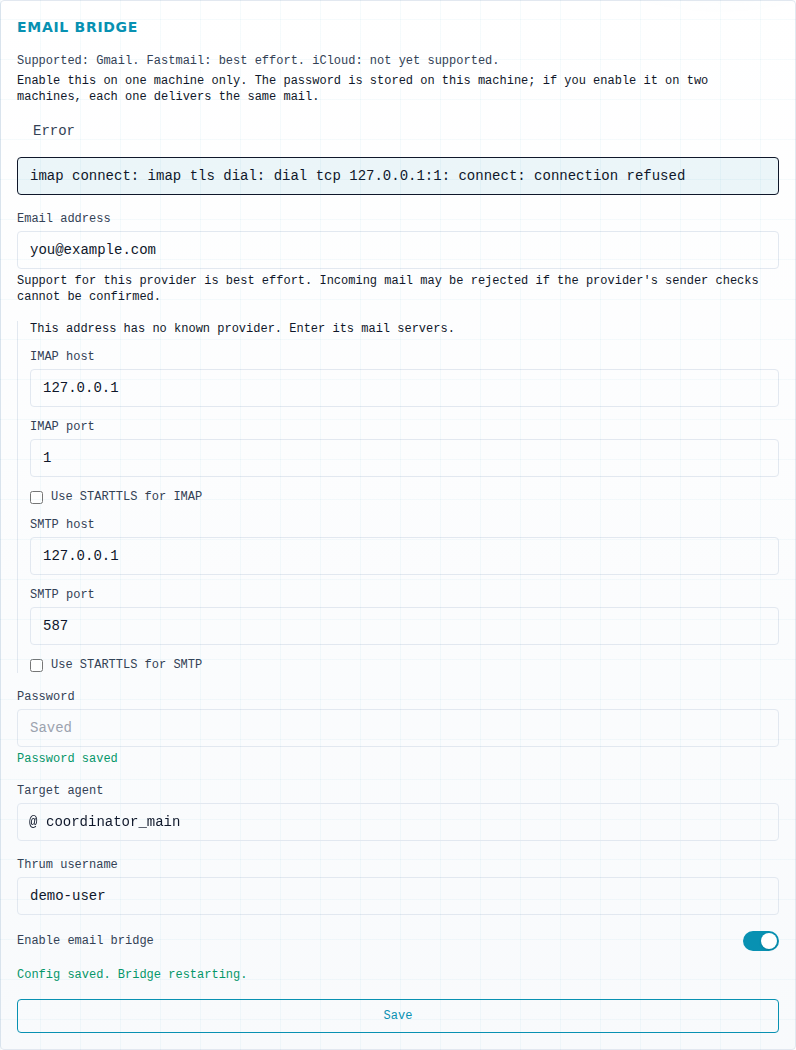
Fix.
- Create a new app password with your mail provider.
- Type it in Password and select Save.
- If your address is not on Gmail or Fastmail, check IMAP host, IMAP port, SMTP host, SMTP port and the Use STARTTLS options against what your provider documents. For an address with no known provider, the ports start at 993 for IMAP and 587 for SMTP, and a value you type wins.
Check it worked: the status reads Running a few seconds after you save.
The status shows Stopped
Section titled “The status shows Stopped”Cause. The bridge is on only when Enable email bridge is switched on, a password is saved and the machine has Pro. If any is missing, the bridge idles and shows no error. The note “(configured but not running)” next to Stopped means the settings are complete but the bridge is not running yet.
Fix. Enter the password, switch on Enable email bridge, and select Save.
Check it worked: the status reads Running.
Save shows an error
Section titled “Save shows an error”Cause. Turning the bridge on needs an address, a password, a fallback agent (the agent that gets a reply Thrum cannot match to the mail it answers), a Thrum username (the Thrum user this mailbox belongs to; if you are not sure, ask your coordinator: What is my Thrum username?) and, for an address with no known provider, the mail servers. The message appears next to the field that is missing:
- “Enter a fallback agent before enabling the bridge.” Fill in Fallback agent for unmatched replies.
- “Enabling needs the thrum user this mailbox bridges to” Fill in Thrum username.
- “Enabling needs a password; none is set” Fill in Password.
- “This address has no known provider. Enter its IMAP and SMTP servers below.” Fill in the mail server fields.
- “Enter one email address.” Put exactly one address in Email address, with no display name.
- “Enter a password, or leave the field empty to keep the saved one.” Type a password, or clear the field.
- “Port must be a whole number from 1 to 65535.” Correct IMAP port or SMTP port.
- “Could not save the settings. Try again.” Save again. If it keeps failing, ask your coordinator:
Read the daemon log for the last hour.
Fix. Fill in the field the message points to and select Save again.
Check it worked: Save shows “Config saved. Bridge restarting.” and the status reads Running.
If a red line says “Could not load the email settings.”, the section could not load its settings. Check that the daemon is running: see Fix common errors.
My mail goes to the wrong agent, or nowhere
Section titled “My mail goes to the wrong agent, or nowhere”Cause. A reply to a mail an agent sent goes to that agent. A new mail goes to each agent you name with @name in the Subject, or in the first line of the body when the Subject names none, and is dropped if no name matches. If your reply went to the wrong place, it may not be a reply: Thrum links your reply to an agent’s mail through the mail’s reply headers.
Fix. Reply to the agent’s own mail, not to a new mail. For a new mail, name the agent with @ in the Subject, as in step 1 of “My email gets no reply”. The fallback agent only gets a reply that Thrum cannot match to its original mail.
Check it worked: the agent you expect answers.
The agent sees the whole earlier thread
Section titled “The agent sees the whole earlier thread”Cause. Thrum delivers the full body of your mail and does not remove quoted text. It uses the subject only to find an @name, and ignores attachments.
Fix. Delete the quoted text before you send, and put what you want in the body.
I get no email from my agents
Section titled “I get no email from my agents”Cause. Thrum emails a message only when an agent sends a message addressed only to you, and only a message created on this machine, and only if your preferred channel is not Telegram and the machine has Pro. If the mail server refuses a send, Thrum makes up to 10 attempts in total, and then tells your coordinator the send failed.
Fix. Ask your coordinator whether it received that message, and check Email address and Password. A permanent refusal, such as a rejected password, is not retried and fails at once.
Check it worked: ask your coordinator to message you, and the mail arrives.
Email notifications do not arrive
Section titled “Email notifications do not arrive”Cause. Notifications run only when Send email notifications is on, a password is saved, Sender address (SMTP login), Send notices to, SMTP host and Notify for user are filled, and the machine has Pro. Only ports 587 and 465 work. If your mail server refuses a message, Thrum tries once and does not send it again, and the Email notifications section in Settings shows the error text.
Fix. In Settings, General tab, Email notifications, check Sender address (SMTP login), Send notices to, SMTP host, SMTP port, Notify for user and Password against what your provider documents (Gmail needs an app password). Select Save. Ask your coordinator to message you.
Check it worked: the status reads Running and the mail arrives.
Mail from a few minutes ago is not picked up
Section titled “Mail from a few minutes ago is not picked up”Cause. Thrum checks the Inbox about once a minute and looks only at mail from the last 24 hours. A mail larger than 10 MB is skipped. A filter that moves mail out of the Inbox hides it from Thrum.
Fix. Wait a minute. Check that your provider keeps the mail in the Inbox, and send a smaller mail.
I get every mail twice
Section titled “I get every mail twice”Cause. The password is stored on the machine where you saved it. If you enable the bridge on two machines, each one delivers the same mail.
Fix. Enable the email bridge on one machine only. Switch off Enable email bridge on the other and select Save.
Check it worked: each mail arrives once.
Changing the config file did not change my password
Section titled “Changing the config file did not change my password”Cause. Thrum keeps the password in its vault, an encrypted store on this machine, not in config.json, so editing the config file does not change it.
Fix. Enter the password in Password and select Save.
Check it worked: Password saved appears under the field.
Still stuck?
Section titled “Still stuck?”- Set up the email bridge: the setup steps and the routing rules.
- Fix common errors: the daemon is not running.