
Use opencode agents
Free and Pro
Your coordinator can start agents that run opencode. Your coordinator is the agent you talk to, which starts the other agents, hands out work and reports back to you. They send and receive messages the same way your other agents do, so the coordinator hands them work and reads their replies.
Before you start
Section titled “Before you start”- Thrum set up in your repository, with a running coordinator. The quickstart starts one on Claude Code. That is the recommended way to begin, and the steps on this page assume it.
- Install opencode on the machine where the agent will run, and set up its model provider the way you do today. Thrum does not sign in for you.
What it looks like
Section titled “What it looks like”This is an example conversation. Your coordinator’s wording will differ.
You:  Put an opencode agent on the docs cleanup for the API folder.
Coordinator:  Created docs_cleanup on opencode, in its own worktree. It has loaded its briefing and has the task. I'll tell you when it reports back.
You:  Which tool is docs_cleanup running?
Coordinator:  opencode. I run Claude Code.
You do not message the opencode agent yourself. The coordinator does.
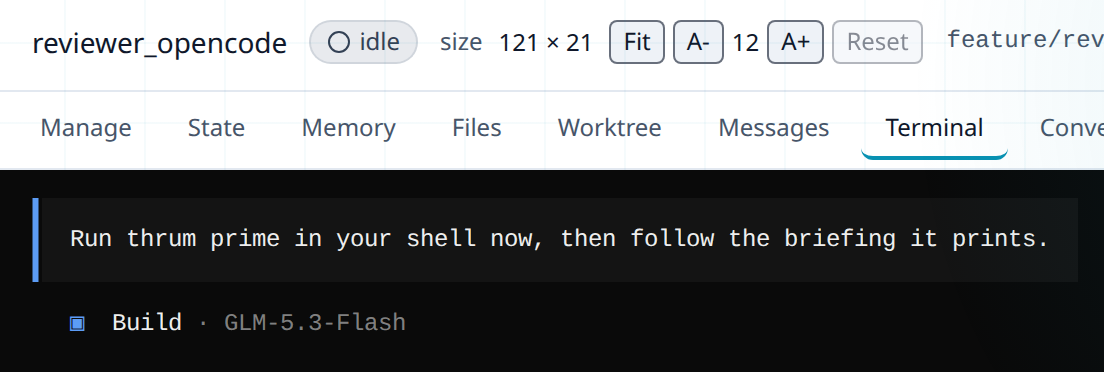
On the Agents grid, select its card and open the Terminal tab. This is how it looks right after a fresh start. The first line asks the agent to run thrum prime, the command that loads its briefing. The briefing is the summary an agent reads at the start of a session. opencode shows its Build agent with the model name next to it:
Add opencode agents through your coordinator
Section titled “Add opencode agents through your coordinator”-
Ask your coordinator (in its terminal, or in My Inbox, your inbox in Thrum’s web UI):
Install the Thrum plugin for opencode, for all folders.Do this once per machine. The plugin installs Thrum’s commands and skills into opencode. It applies to every folder, which matters because each agent works in its own worktree. A worktree is a separate checkout of your repository on its own branch. Your coordinator then starts opencode once, so the plugin installs its files.
-
If opencode offers an upgrade to 2.x, decline it. Thrum does not support opencode 2.x yet, because it lacks the
-mmodel option Thrum uses and its plugin interface has changed. If you see the prompt in your own terminal, decline it yourself. -
Ask your coordinator to create the agent, as in the example. The New agent dialog in the web UI has no tool choice and always starts Claude Code, so for opencode you ask the coordinator in plain words.
-
Give the coordinator the task. It sends the task to the opencode agent and brings you the result.
-
Check it worked. Open the Agents page and select the agent, then open its Terminal tab. You see opencode’s own screen, like the picture above. Or ask the coordinator:
Is the Thrum plugin installed in opencode?orWhich tool is each agent running?
If your coordinator will run in opencode
Section titled “If your coordinator will run in opencode”Skip this section if your coordinator runs in Claude Code. If opencode will be your first agent, there is no coordinator to ask yet, so install the plugin yourself. The plugin is the npm package opencode-thrum-pro. Free and Pro both use this same plugin, and installing it needs no licence. Run this once per machine:
opencode plugin opencode-thrum-pro --global -f--global applies the plugin to every folder, which matters because each agent works in its own worktree. Start opencode once so the plugin installs its files. Decline opencode’s upgrade prompt to 2.x, which Thrum does not support yet.
To update the plugin for a coordinator that runs in opencode, there is no other coordinator to ask, so you do it yourself. Delete the cached copy and install again, then restart opencode. The first command deletes opencode’s cached copy of the plugin. The second installs it again. If your coordinator runs on Claude Code, ask it instead (see Tips).
rm -r "${XDG_CACHE_HOME:-$HOME/.cache}/opencode/packages/opencode-thrum-pro@latest" && opencode plugin opencode-thrum-pro --global -fWhat Thrum does for you
Section titled “What Thrum does for you”When the coordinator starts an opencode agent, Thrum:
- Runs
opencodein a tmux session, in the agent’s own worktree. tmux keeps each agent running in its own terminal session. - Passes the model if you named one.
- Starts the session with a prompt that tells the agent to run
thrum prime, which loads its briefing. - Writes an
opencode.jsoninto the agent’s folder. It points opencode at Thrum and sets what the agent may do without asking:- Allowed without asking: Thrum and Beads commands, common read commands such as
ls,cat,grepandgit status,git add,git commitandgit push, a set of build and file commands (such asmake,go,mkdir,cpandmv), and file edits. - Refused:
git checkout,git reset,git restore,git stash,git clean,git rebaseandsudo. - Asks first: any other shell command, and fetching a web page.
- You can edit this file. Thrum keeps your changes and only adds back any of its own allowed commands that are missing, unless you run
thrum runtime init --force, which rewrites it.
- Allowed without asking: Thrum and Beads commands, common read commands such as
The agent uses Thrum by running thrum commands in its shell. Thrum over MCP explains the other way a tool can reach Thrum.
Models
Section titled “Models”Thrum checks the model name you give for opencode against the models it knows. If a launch is refused over the model name, the coordinator tells you. Ask it which opencode models it can use, then pick one of those.
Next steps
Section titled “Next steps”- Mix runtimes and models: put each task on the tool and model that fits it.
- Run agents in tmux: where the agent’s session lives and how to watch it.
- Answer permission prompts: what happens when an agent stops to ask.